
When developing custom features in Odoo 19, one of the most useful UI enhancements you can add is a popup detail view. This allows users to quickly access related information without leaving the current page, navigate between related records with complex data relationships.
Why Use a Detail Popup Button in Odoo 19?
Popup buttons have become a standard part of Odoo’s interface because they help users access related information quickly and efficiently. Instead of navigating through multiple menus or switching between views, a popup button opens the necessary details in a clean modal window.
Key Benefits of Using Popup Buttons
- Better User Experience
Popup buttons reduce unnecessary navigation. Users stay on the same form while reviewing or editing related data, making the workflow more intuitive and less disruptive.
- Faster Access to Related Records
Whether you're showing invoice details, rate configurations, product breakdowns, or approval history — a popup provides instant access without switching models.
- Cleaner and Less Cluttered UI
Instead of creating multiple tabs or additional tree views, a popup isolates the details in a focused window. This keeps your main form clean and easier to maintain.
- Ideal for Models With Multi-Layer Data
Some models require multiple layers of configuration or relationships. Popup buttons are perfect for:
- Product attribute details
- Financial breakdowns
- Employee-related info (contracts, allowances, leave stats)
- Manufacturing steps
- Custom configuration lines
- A Standard Pattern Users Already Expect
Across different Odoo apps — Sales, Inventory, Accounting — popup buttons are widely used. Adding one in your custom module ensures consistency with native Odoo behavior.
Use Case
In my project, I created a CPF Contribution module with three models:
- Contribution Header (sgeede.cpf.contribution)
- CPF Line (Age Range) (sgeede.cpf.line)
- CPF Rate Rules (sgeede.cpf.rate.line)
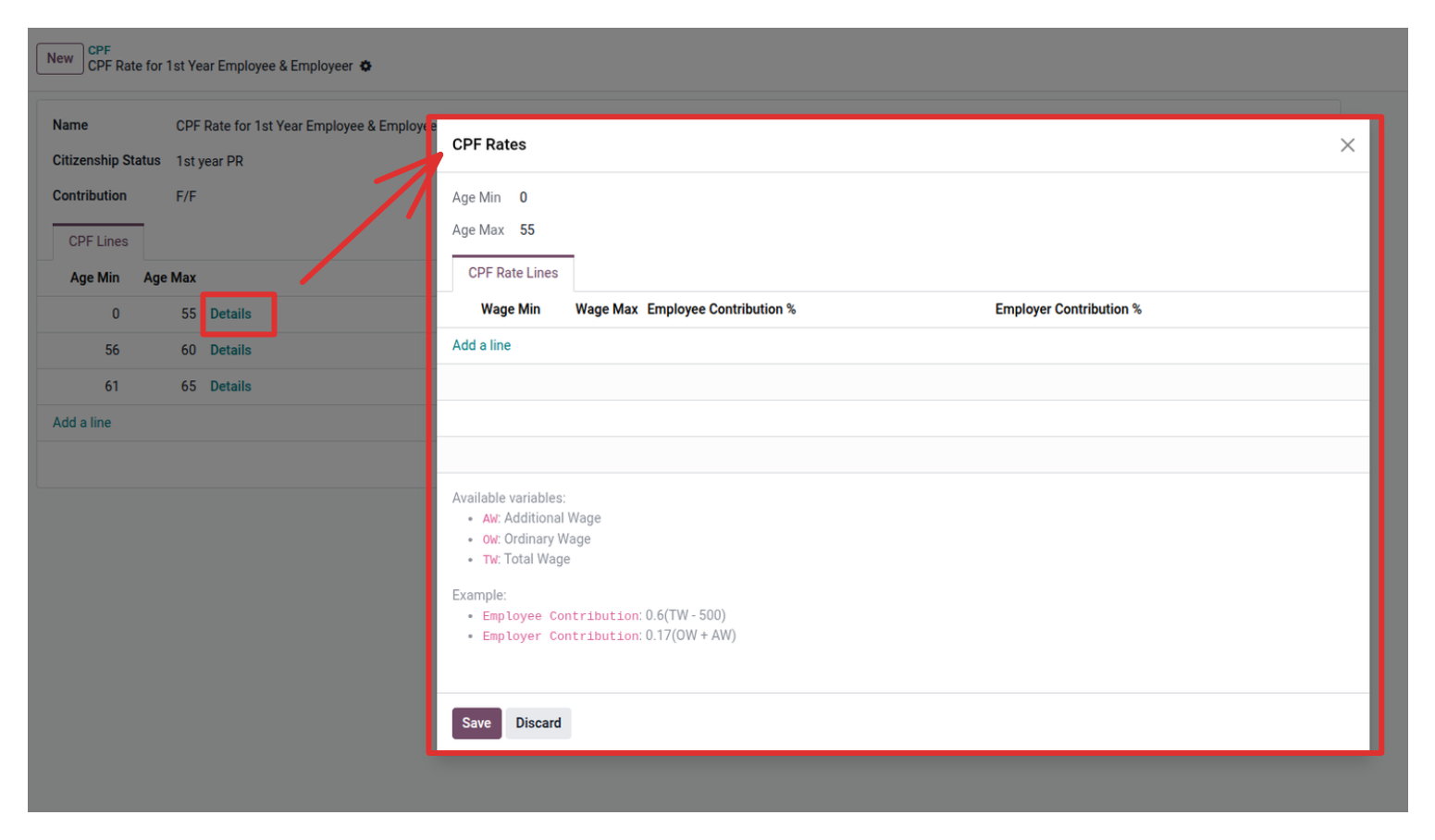
Each CPF Line contains multiple rate rules based on wage ranges. Without a popup, users had to click through several menus to view these details.To make the workflow smoother, I added a button that opens the rate details inside a modal popup — giving users instant access to formulas, wage ranges, and contribution percentages.
Defining the Models (General Structure)
To create a popup button, you typically have at least two related models. I built the model structure needed for CPF rules.
CPF Contribution model
class SgeedeCPFContribution(models.Model):
    _name = 'sgeede.cpf.contribution'
    _description = 'Sgeede CPF Contribution'

    name = fields.Char(string="Name")
    status = fields.Selection([...])
    employee_terms = fields.Selection([...], default="f/f")
    sgeede_cpf_line_ids = fields.One2many(
        'sgeede.cpf.line', 'cpf_contribution_id'
    )
CPF Line Model
class SgeedeCPFLine(models.Model):
    _name = 'sgeede.cpf.line'
    _description = 'Sgeede CPF Contribution Line'

    cpf_contribution_id = fields.Many2one('sgeede.cpf.contribution')
    cpf_rate_ids = fields.One2many('sgeede.cpf.rate.line', 'cpf_id')
    age_min = fields.Integer()
    age_max = fields.Integer()
CPF Rate Line Model
class SgeedeCPFRateLine(models.Model):
    _name = 'sgeede.cpf.rate.line'

    cpf_id = fields.Many2one('sgeede.cpf.line')
    wage_min = fields.Float()
    wage_max = fields.Float()
    employee_contribution = fields.Text()
    employer_contribution = fields.Text()
Implementing the Detail Popup Button in Odoo 19
The core of the feature is the ir.actions.act_window. This action opens a specific record in a modal popup.
def action_show_details(self):
    self.ensure_one()
    return {
        'type': 'ir.actions.act_window',
        'name': 'CPF Rates',
        'res_model': 'sgeede.cpf.line',
        'res_id': self.id,
        'view_mode': 'form',
        'target': 'new',
        'views': [(False, 'form')],
        'context': {
            'form_view_ref': 'l10n_sg_hr_payroll.view_sgeede_cpf_rate_form',
        }
    }
The button will looks like this after adding some views
What this action does
| Parameter | Purpose |
| type | Tells Odoo to open a window |
| res_model | The model shown in the popup |
| res_id | The exact record to load |
| view_mode | Uses a form view |
| target='new' | Opens a modal popup |
| views | Uses the default form view |
| context | Allows passing a custom form view |
Why This Pattern Works So Well in Odoo
Odoo applications rely heavily on relational data. Popup buttons:
- Provide contextual information
- Improve navigation
- Reduce user confusion
- Highlight key related data
- Maintain workflow continuity
Whether you are designing HR, inventory, manufacturing, or finance modules — a popup button helps present data in a simple and structured way.
Conclusion
A Detail Popup Button is one of the most effective ways to enhance the user experience in Odoo 19. It allows users to open important information in a modal view without leaving the main record. With a clean model structure and a simple act_window action, you can implement this feature easily in any custom module.By understanding how this buttons work and when to use them, you can build more intuitive, professional, and Odoo-native interfaces that users will appreciate.