
Server Actions in Odoo 17 let you automate tasks through the user interface—no coding needed. This guide walks you through the most common types of Server Actions and shows exactly where to click, with screenshot placeholders to help you recreate the steps visually.
⭐ Before You Start: Enable Developer Mode
To access Server Actions, you must turn on Developer Mode.
Steps
- Go to Settings.
- Scroll down to Developer Tools.
- Click Activate Developer Mode.
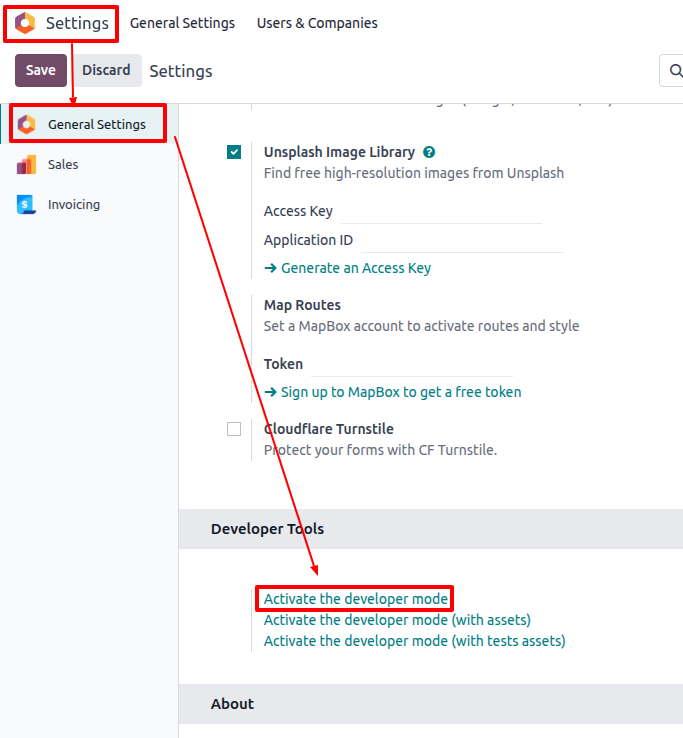
⭐ Where to Find Server Actions
Go to:
Settings → Technical → Automation → Server Actions

1. Update Record
What it does
Automatically updates one or more fields on a record.
How to Create an "Update Record" Server Action
Step 1: Create a New Server Action
Click New.

Step 2: Enter Basic Information
Name: Set sales person to marc demo
Model: Sales Order

Step 3: Set Action Type
Action To Do = Update the Record

Step 4: Add Field Updates
- Under Action Details, Select the field (e.g., Salesperson).
- Choose the new value.

2. Create Activity
What it does
Creates a reminder on the chatter (e.g., call, email, meeting).
How to Create a “Create Activity” Action
Step 1: New Server Action
Click New.
Step 2: Basic Details
Name: Follow-up Call for Sales
Model: Sales Order

Step 3: Select Action Type
Action To Do = Create Activity

Step 4: Configure Activity
Fill in:
- Activity Type (e.g., Call)
- Assigned To (e.g., Salesperson)
- Due Date → In 2 days
- Summary → Follow up with the lead
- Note → optional details

We'll explore further about server action in future articles regarding other types of server action, and how to create contextual action to trigger the action manually in the relevant record.