We will explore more fields widgets that are available to use in Odoo. To look at previous widgets discussed, go to this article
1. Email
Indicate the char field represents an email address. This will also show a quick button to send email to the address inputted to the field.
<field name="field_char" string="email" widget="email"/>

2. Phone
<field name="field_char" string="phone" widget="phone"/>
Inform that this char fields is a phone number. Also give a shortcut to call the number in the field.

3. URL
<field name="field_char" string="URL" widget="url"/>
Indicate char fields as a link, clicking the icon on the right will open a new tab to visit the URL.

4. Selection State
Set selection field to be a colored option.
<field name="kanban_state" widget="state_selection"/>
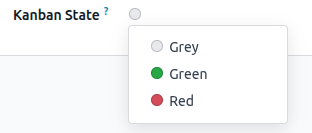
NOTE: This selection fields requires certain values configuration (values, color) for the color to appear ! Otherwise it will appear as grey.
kanban_state = fields.Selection([
('normal', 'Grey'), ('done', 'Green'), ('blocked', 'Red')], string='Kanban State', default='normal')
5. Boolean Toggle
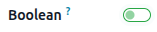
Set the boolean field as a toggle rather than a checklist
<field name="field_boolean" widget="boolean_toggle"/>
6. Statusbar
Set the selection field to be a bar showing the selection field options
<header>
<field name="state" widget="statusbar"/>
</header>
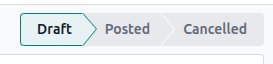
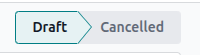
Note: With the additon of "statusbar_visible" we can control what values is shown all the time. The hidden status will be shown once the field is set to said options.
<field name="state" widget="statusbar" statusbar_visible="draft,cancel"/>
7. Float Time
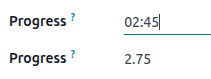
Change the float field to represent time in the hour:minutes format.
Odoo will save the time representation as a float number
<field name="progress_float" widget="float_time"/>
Note: The formula for conversion to float is hour will be the whole number, while the minute will be added as decimal after being divided by 60 minutes.
e.g: 02:45 = 2 (2 hour).75 (45/60 minutes)